InDro Cortex, Controller open a near limitless world of robotic possibilities

InDro Cortex, Controller open a near limitless world of robotic possibilities

By Scott Simmie

We were tempted to use the word “infinite” in the headline above.

Because really, when it comes to customising a robot or industrial drone into pretty much any configuration, our InDro Cortex (hardware) and InDro Controller (software) can handle the task. A one-off wheeled quadruped for autonomy research at an academic institution? Check. A humanoid carrying out pick-and-place work in a factory setting? Check. A wheeled or tracked ground robot carrying out regular autonomous inspections on remote assets? Check, check, and check.

Once you factor in the growing number of sensors, platforms and use-cases, the potential combinations run into the thousands (if not more). We are pleased to confidently state that the synergy of InDro’s Cortex and Controller can handle virtually all of them.

Why so confident? Let’s find out.

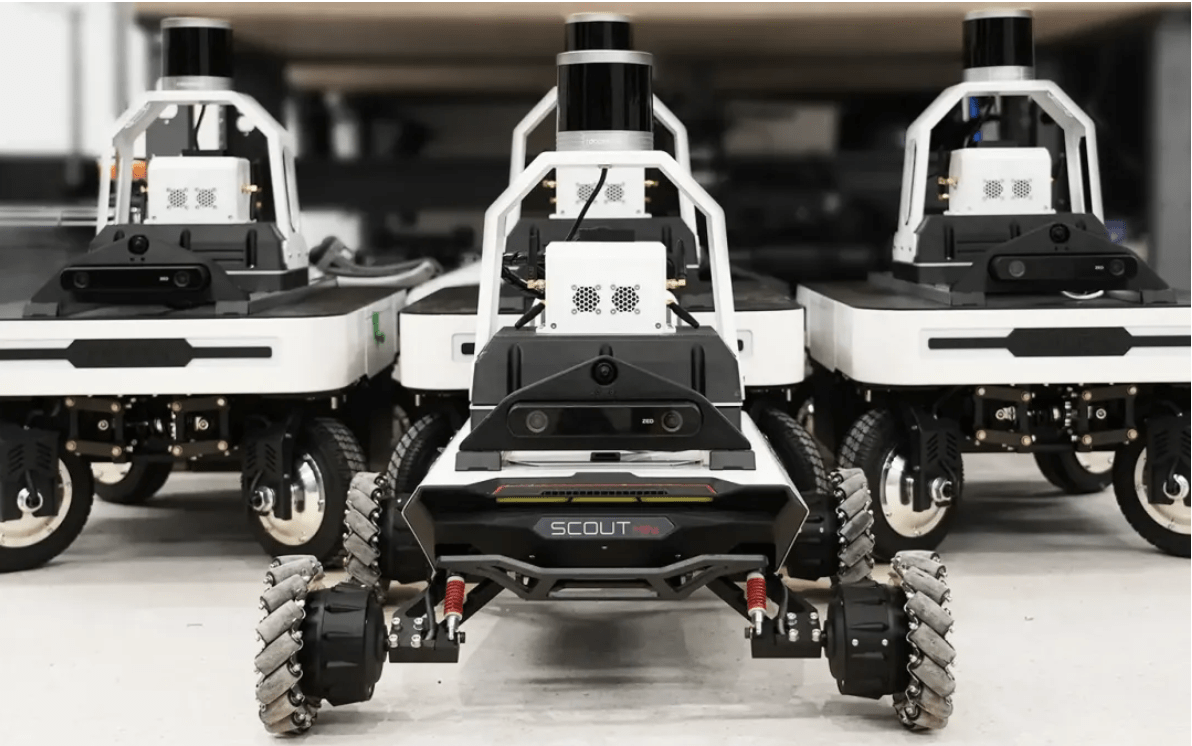
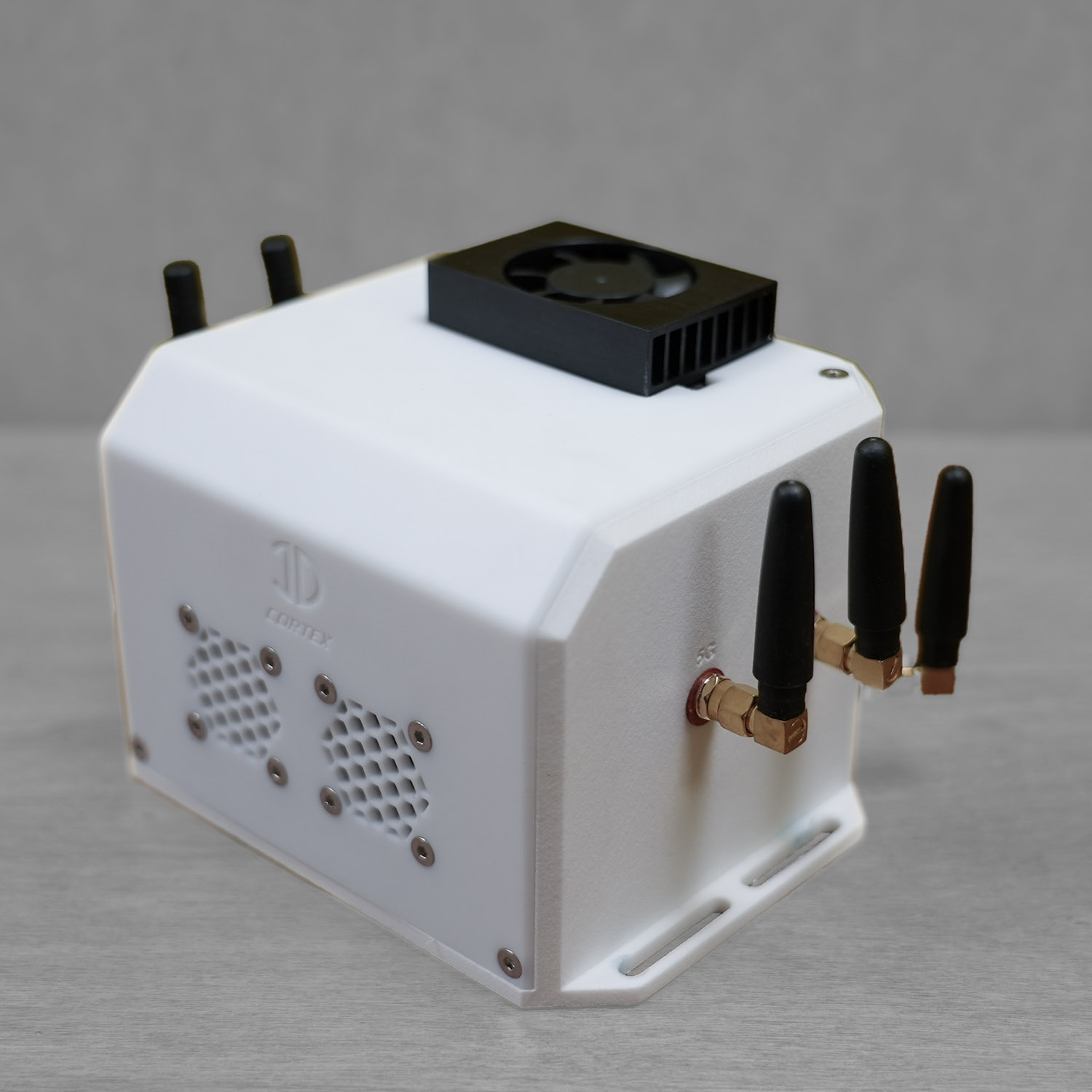
Above: A fleet of AgileX platforms, all outfitted with InDro Cortex, InDro Controller, and multiple sensors before shipment to a client. Below: The tiny but powerful Cortex

InDro Cortex Robot Developer Kit for Autonomous Robots and Drones

WHAT IS INDRO CORTEX?


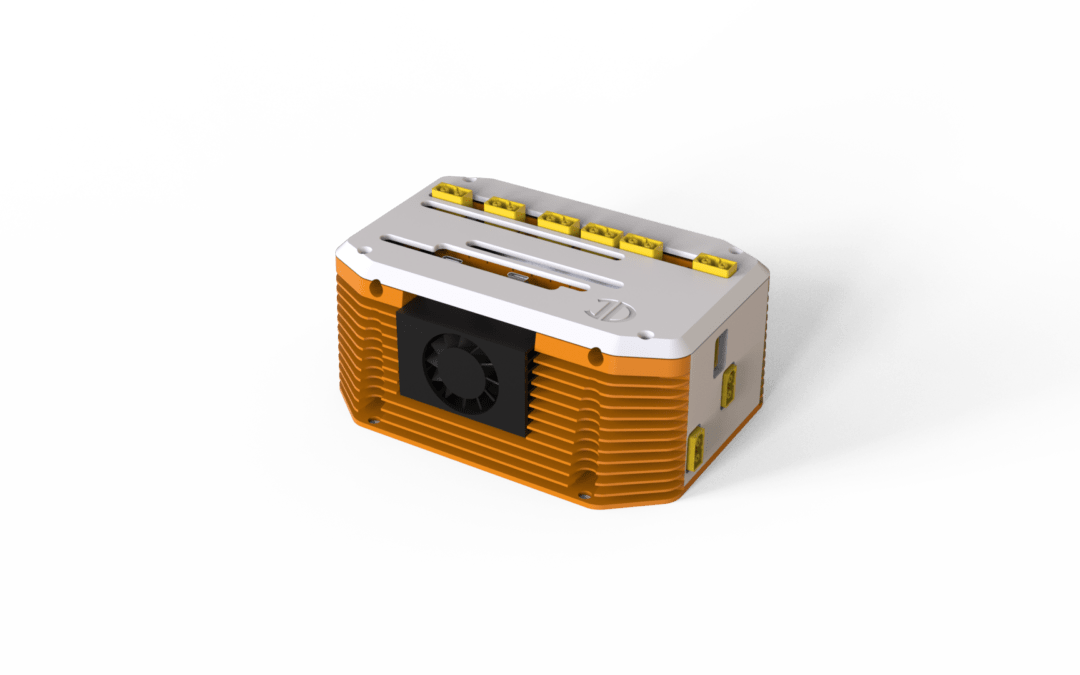
The simple answer is that it’s an incredibly powerful yet very small brain box and sensor interface that can be mounted on any robotic platform. It can transmit data over 5G networks with imperceptible lag and receive instructions from a remote operator. Measuring 11cm x 14cm x 10cm, and weighing a mere 679 grams, Cortex has been designed from the ground up – including custom PCBs – by our engineering team. It’s platform-agnostic, meaning you can use it with virtually any robotic framework.

Sensor integration – and the fusion of sensor data – is a breeze, With multiple I/O and power options, you simply plug & play. That’s because Cortex is preloaded with ROS2 Humble, which contains all the software tools, libraries, drivers, and communication protocols that allow for near-instant integration of any and all sensors. Power supply for those sensors is provided by Cortex (which is powered by the platform itself).

Looking for the compute required for seamless sensor fusion and demanding AI applications? You’ve got it: Our base Cortex comes with a processor capable of 100 TOPS (trillions of operations per second). If your use-case or application demands more powerful compute, we’ll happily upgrade that to your requirements.

Running on Ubuntu 22.04 LTS paired with ROS2 means Cortex is ideally suited for robotics work. That duo have become the standard for most robotics companies, R&D organisations and academia. (LTS, by the way, stands for Long-Term Support, meaning Cortex receives regular security, maintenance and other Ubuntu updates as they’re released).

For communication, Cortex ships with a small but powerful 5G modem, allowing you to remotely control your robot (and see all the data) with nearly imperceptible lag. It can operate on public or private 5G networks, as well as over WiFi. Clients sometimes purchase Cortex and Controller (which we’ll get to shortly) as a standalone and integrate their own robots. Others buy the pair as part of a custom robotics package we design and integrate. Several years of intense research have gone into building Cortex – which is now one of InDro’s core products.

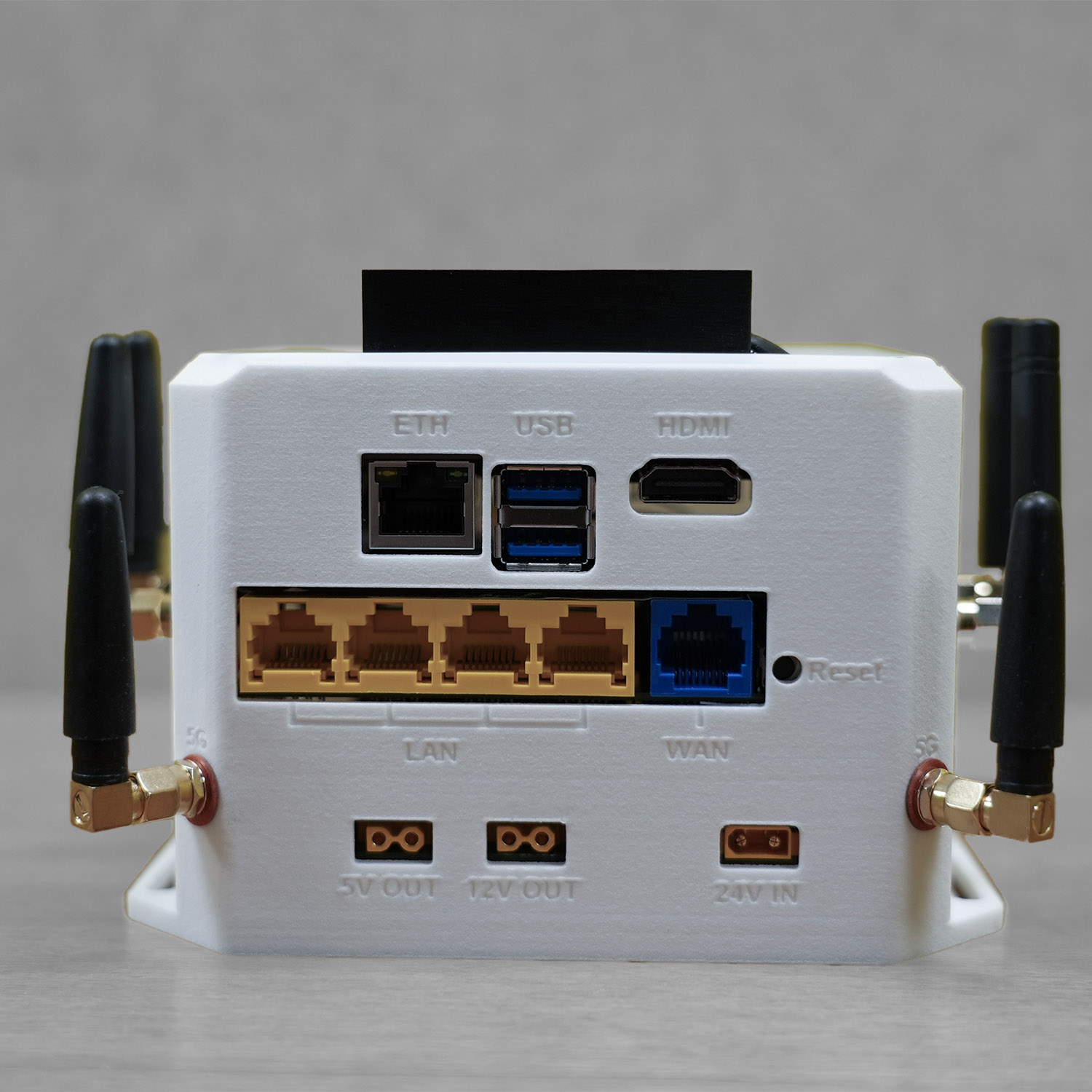
Below: Just one example of a potential package where all sensors integrate with Cortex, though we frequently build far more complex systems. Image two shows the multiple I/O options that come on our standard Cortex

InDro Cortex Robot Developer Kit for Autonomous Robots and Drones

CORTEX AND CONTROLLER – A PERFECT PAIR


Imagine our Cortex hardware as a Formula One car. Now picture InDro Controller software as the driver and pit crew.

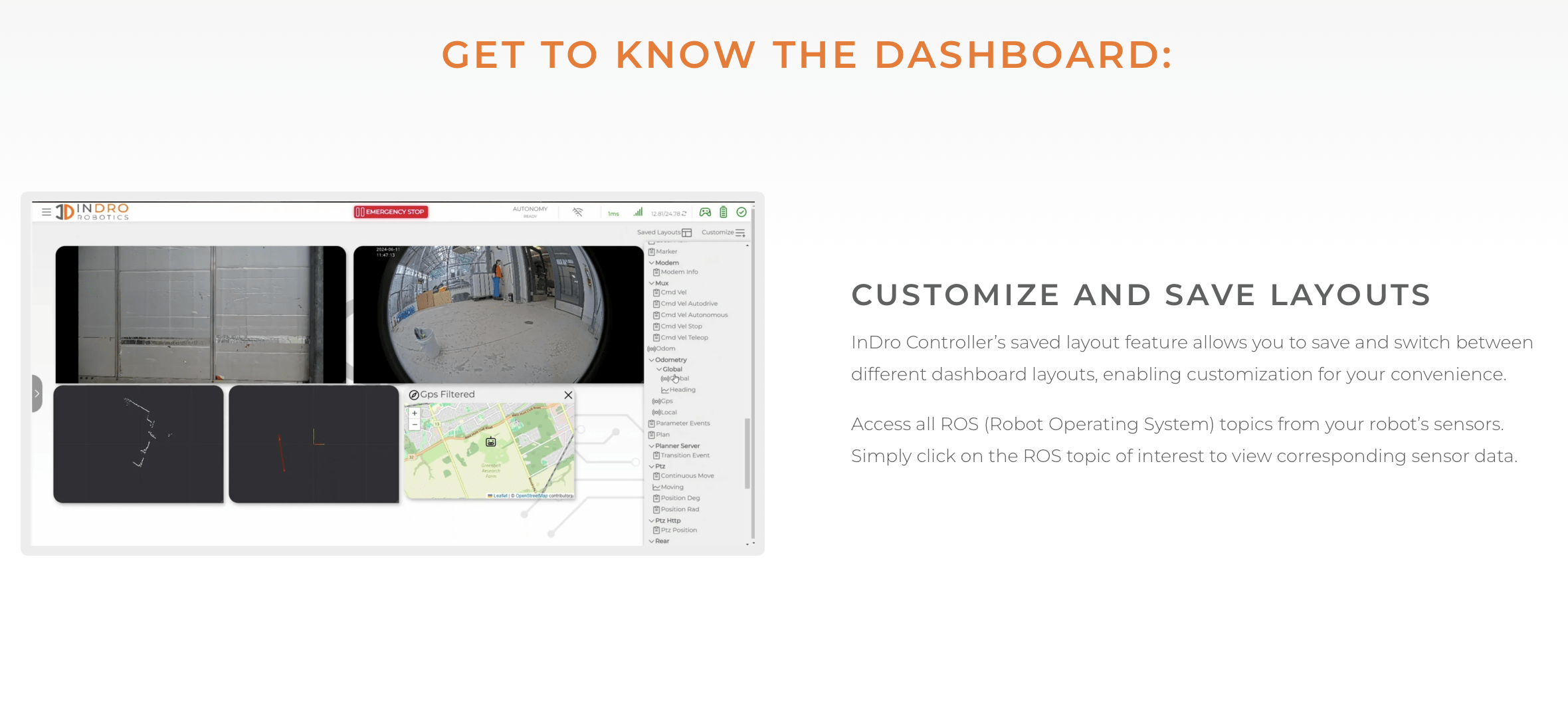
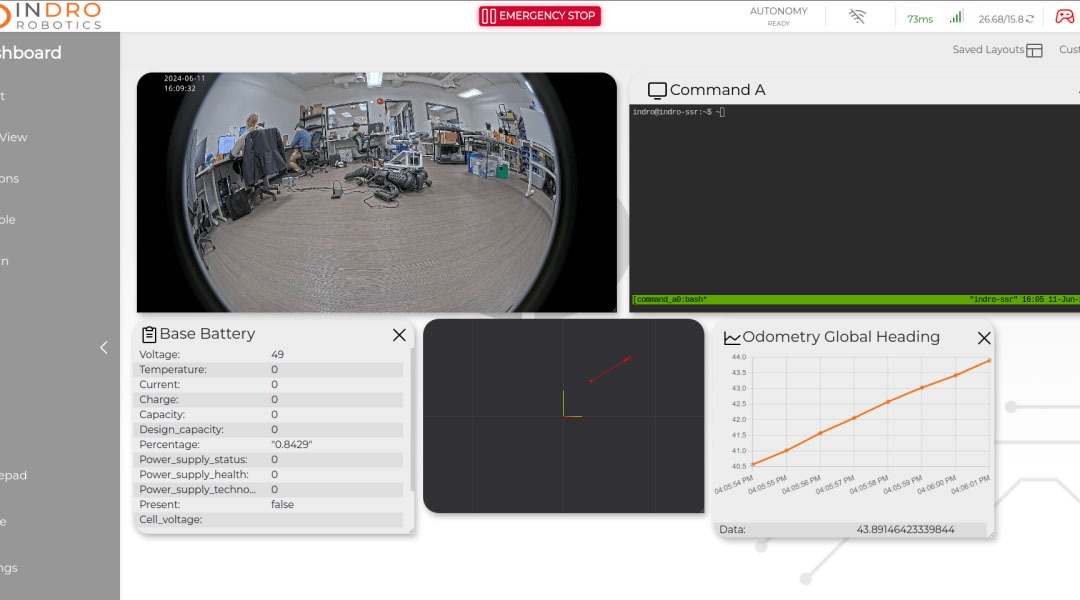
While InDro Cortex processes vast quantities of data at high speeds, InDro Controller allows you to see that data and control the robot. Using a highly secure desktop interface created by our front-end development team, Controller offers an intuitive dashboard that allows you to carry out operations in three ways: Manually, autonomously with pre-programmed waypoints, and even in GPS-denied environments using LiDAR SLAM or vSLAM.

With multiple sensors running on a given robot (or drone), the dashboard allows you to easily move and size windows for data display and location. You can program waypoints at the click of a mouse, and have a robot carry out specific tasks at each waypoint. For example, you could have a PTZ camera tilt and zoom in on a specific gauge to read it, or stop and check on a component where a temperature change might indicate trouble. You can save endless missions and set them to run automatically at desired intervals.

The InDro Controller software lives onboard Cortex; you simply type in the URL associated with your robot and the encrypted login display pops up.

Our InDro Autonomy software stack is optional (though popular). But, as with Ubuntu LTS, users can rely on long-term support and upgrades from InDro. If we tweak something to improve a feature of InDro Controller (or any of our other software stacks), clients get that upgrade. InDro stands behind its products and ensures our users can maximise their potential.

Below: Just one of many custom views on the InDro Controller dashboard

Custom Integrated Robots

INDRO’S TAKE


You’ve heard the metaphor – the one about “standing on the shoulders of giants.” In this case, Cortex is the logical successor to our highly successful InDro Commander. Released more than three years ago, Commander was a breakthrough in simplifying the integration of R&D robots and for custom builds. Now, after several years of work, Cortex is the logical successor. It’s smaller, more powerful, and comes with the highly evolved InDro Controller.

“Cortex is the result of a tremendous amount of R&D from our Area X.O engineering team,” says InDro Robotics Founder and CEO Philip Reece. “It not only greatly simplifies building complex robots, but can vastly enhance robotic platforms ranging from engineering research robots through to military defence platforms. It, along with Controller, will be core InDro products for many years to come.”

To learn more about InDro Cortex and Controller, drop a line to our Head of R&D Sales, Luke Corbeth. He’s a no-pressure pro who loves talking about use-cases and solving problems.

New InDro Sentinel has wireless charging enclosure for remote operations

New InDro Sentinel has wireless charging enclosure for remote operations

By Scott Simmie


If you follow our news, you’re likely familiar with our Sentinel inspection robot. It’s been built specifically for monitoring critical assets like electrical substations etc. – places where you need regular eyes on assets without the cost and inconvenience of having a human being on site.

We are pleased to announce that InDro Robotics has perfected an outdoor enclosure that keeps Sentinel protected from harsh weather, while allowing for wireless recharging.

“If you imagine a robot in any sort of demanding outdoor environment to improve the longevity of the equipment, you want to keep it away from the elements as much as possible – which is why the enclosure exists,” explains Luke Corbeth, InDro’s Head of R&D Sales.

“For any demanding outdoor application such as substation inspection, solar farm inspection, etcetera, you’re going to want to keep the robot out of the rain, away from the wind, out of direct heat. These elements are why the enclosure exists.”

And the best part? Sentinel can autonomously return to that enclosure to rest and recharge completely on its own. And that makes it perfect for even the most distant of assets. If there’s a cellular connection, Sentinel can be a totally remote employee.

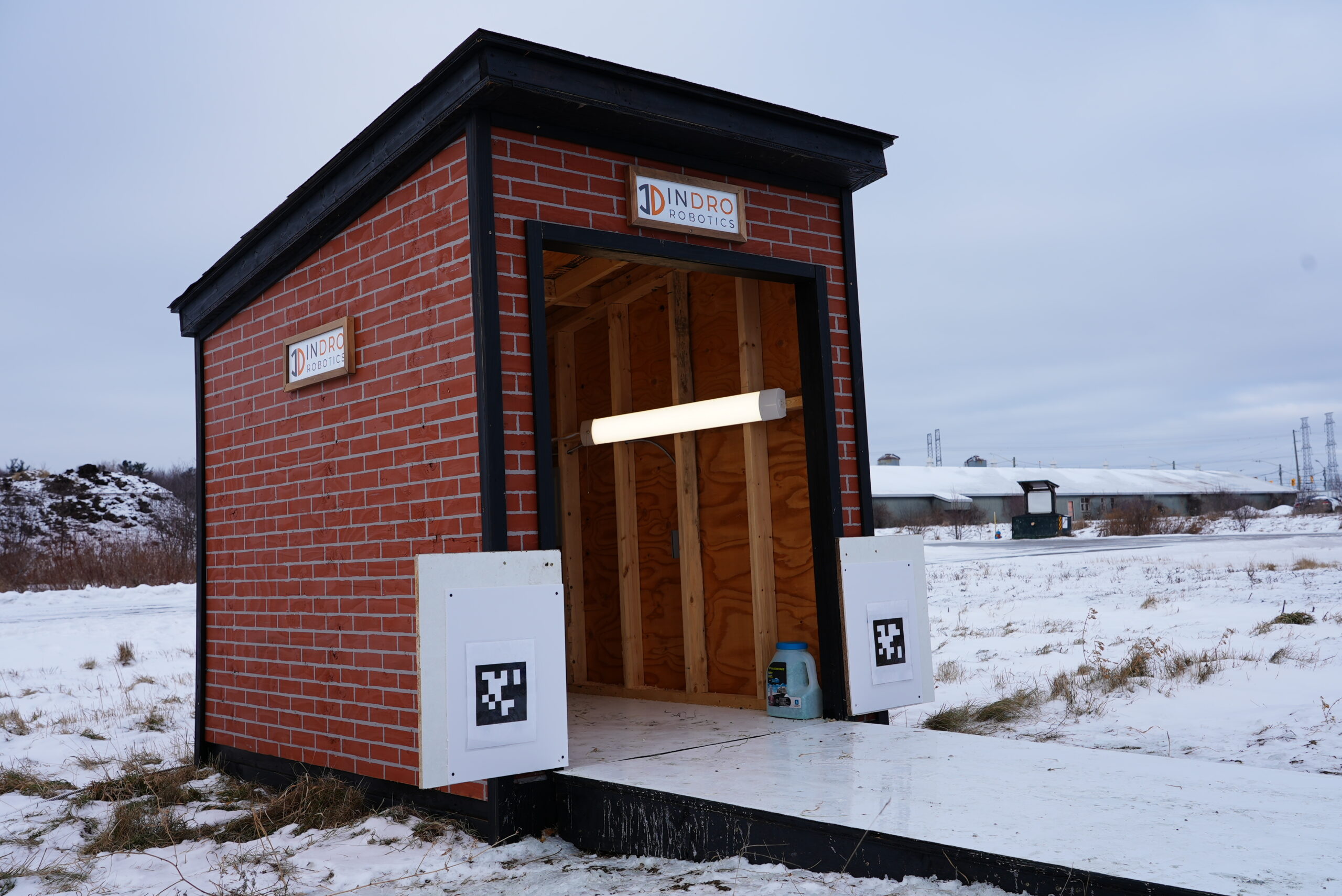
Below: The new Sentinel enclosure, on site at our R&D headquarters at Ottawa’s Area X.O

Sentinel enclosure Ottawa Hydro

JANUARY, FEBRUARY, MARCH…


And what comes next? April, of course. And the reason we’re going down this road is because Sentinel finds its roost using a code known as AprilTags. They’re similar to QR codes, but have been designed for 3D orientation. Sentinel’s enclosure uses AprilTags – which are detected by onboard cameras – for the robot to find its way home, and snug up nice and close to its wireless recharging system.

“The robot is trained to know exactly what these tags look like from every angle,” says Corbeth. “And by looking at these tags, it’s able to determine: ‘Oh, I’m a little bit off in this direction, so I need to make this adjustment.’ That ensures that we have a smooth and reliable docking and undocking sequence every single time the robot goes in and out of the enclosure.”

There’s a slightly inclined ramp for Sentinel to access this tiny recharging home. And the floor is deliberately a bit slippery in order for Sentinel to fine-tune its docking procedure by, for lack of a better word, drifting inside the enclosure to get its bearings.. And the charging system? Amazing.

The Wibotic charger is incredibly efficient. One hour of wireless charging is enough for Sentinel to fully recharge and deploy on a five-hour mission. Let’s repeat that: One hour of wireless charging gives Sentinel five hours on the ground.

The other advantage is that, because it’s wireless, there are no mechanical interfaces. These can be a potential point of failure, which is the last thing you’d want on a remote, autonomous installation. The whole point of these installations is for a robot to take care of things on its own.

“Anytime you have a mechanical interface, there are usually prongs involved. These can get bent or damaged – which is the last thing you’d want on a remote installation. So wireless charging completely eliminates that potential point of failure,” says Corbeth.

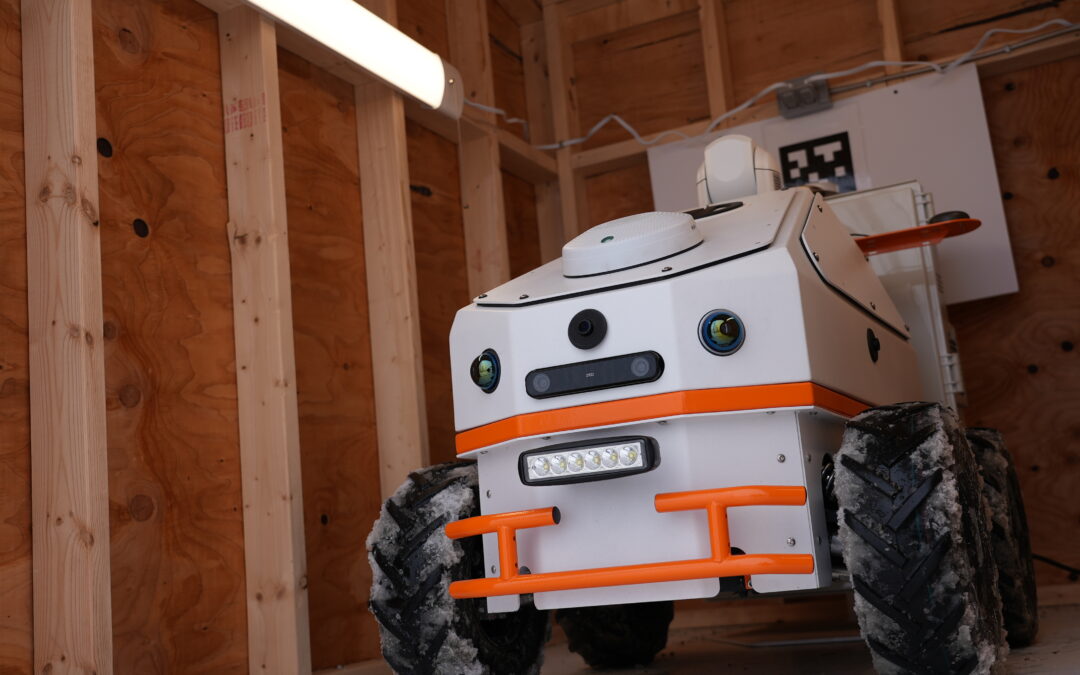
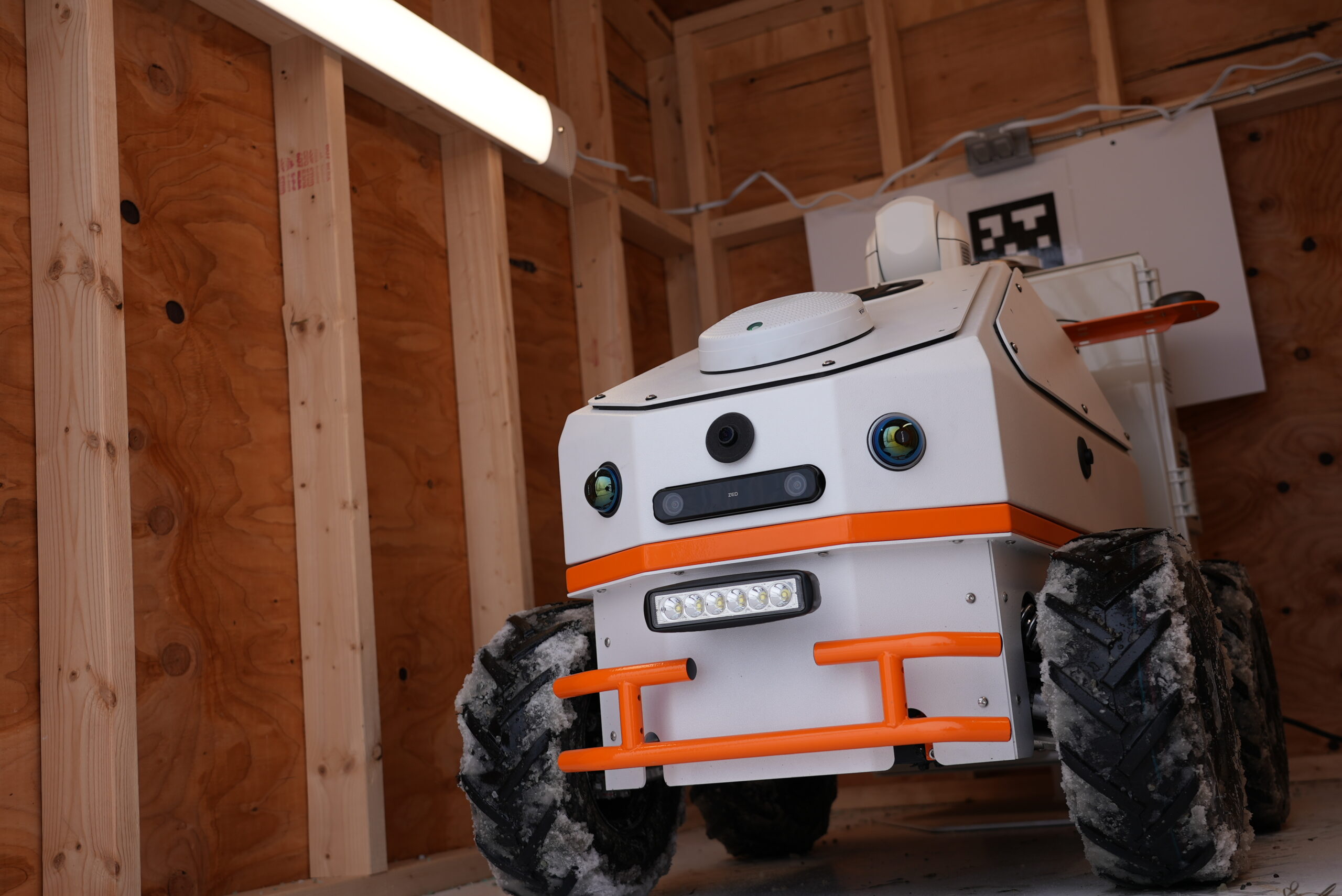
Below: Sentinel in its enclosure. You can see one of the AprilTags, which are used for Sentinel to perfectly align with the Wibotic charger


Sentinel enclosure Ottawa Hydro

REAL WORLD DEMO


Sentinel has been through multiple iterations as platforms, sensors and  compute improve. The newest version uses a wheeled platform (though a separate version with treads is available). Compute is a powerful AI-enabled processor capable of many Trillions of Operations per Second (TOPS). And because we deploy with InDro Controller, our in-house user interface, Sentinel can be easily programmed to repeat highly complex tasks.

Say, for example, you are particularly interested in the reading on a gauge. The first time you deploy Sentinel using InDro Controller, you would manually adjust the Pan-Tilt-Zoom camera to capture an image of that asset. But once you’ve done it once? InDro Controller remembers the settings – so you can deploy Sentinel on an autonomous mission and it will remember all parameters. It will capture the same image, on its own, during any subsequent deployment. This applies to any sensor, capturing any data.


HYDRO OTTAWA DEMO


Recently, InDro got in touch with Hydro Ottawa. We were looking to deploy Sentinel in a real-world situation, and Hydro Ottawa has an electrical substation in the city. We were interested in testing Sentinel in that scenario, and Hydro Ottawa was interested in seeing what Sentinel could do.

We deployed over the Rogers 5G network, using InDro Controller to quickly plot its route and some specific Points of Interest (which did indeed include a gauge). Then we let Sentinel go about its business completely on its own with an autonomous mission.

The result? Phenomenal. Sentinel captured all the salient data, demonstrating its immense capabilities as a ‘set and forget’ robot. Now that the data is in InDro Controller, Sentinel can carry out the same mission on a schedule with zero human intervention. Data will be automatically uploaded – and Sentinel is even capable of sending alerts if, say, that gauge was sending a reading of concern.

“We were able to plot a full preventative maintenance mission – and then run it autonomously several times within a two-hour window,” says Corbeth.

What’s more? It was freezing cold, putting Sentinel to the test in a harsh environment. This is what this robot was built to carry out – and can operate in environments from -20C to +30C.

And the Hydro Ottawa people?

“They were blown away,” says Corbeth. “They even told me: ‘Luke, your team should be very proud.'”

We are.

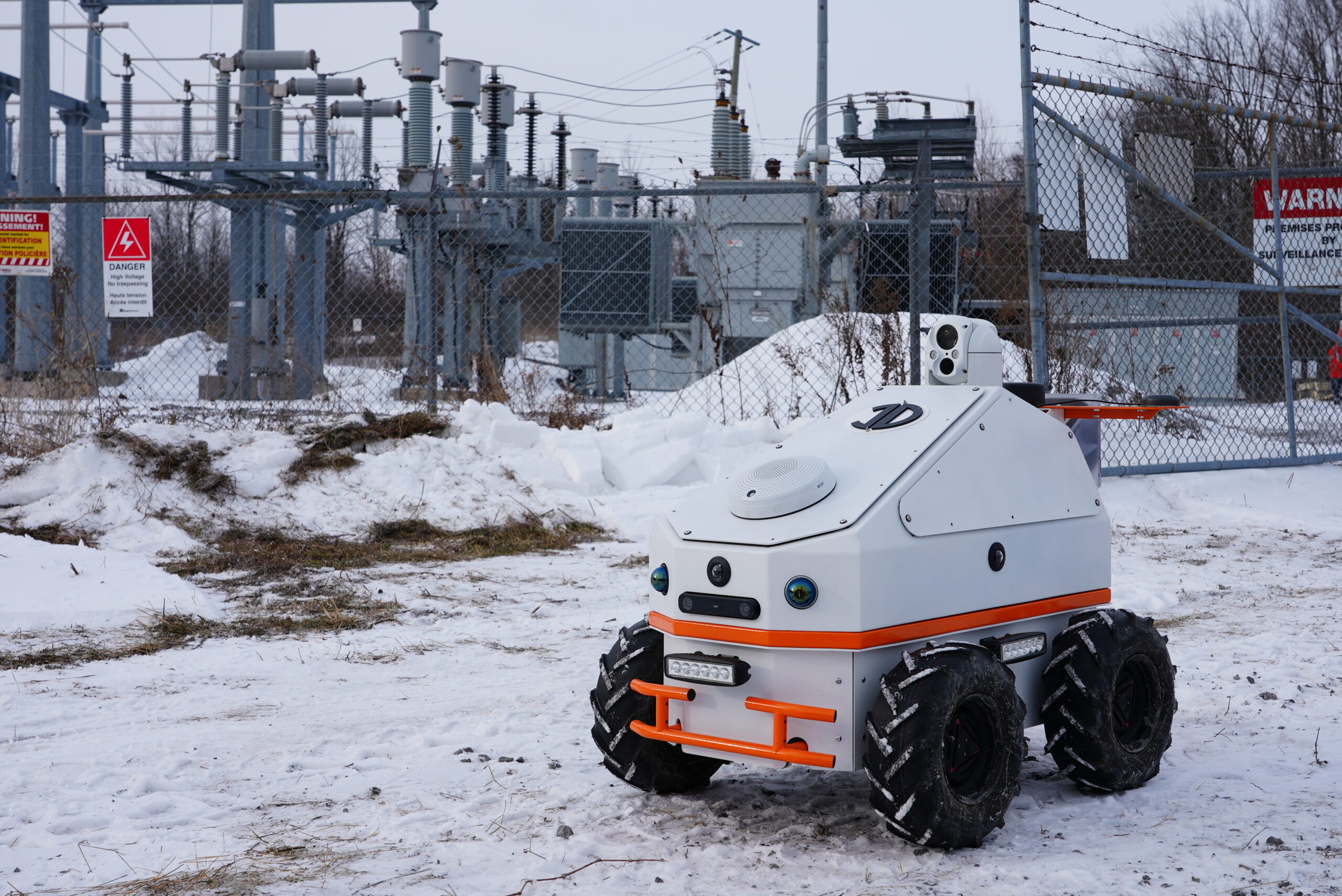
Below: Sentinel at a Hydro Ottawa substation


Sentinel enclosure Ottawa Hydro

INDRO’S TAKE


Sentinel has been an ongoing project for InDro for several years. We have continually upgraded the product as newer sensors and AI compute capabilities have become available. In conjunction with InDro Controller, this is now a fully commercial product. In fact, we recently shipped three of these to a US client and look forward to reporting on this when they are first deployed (which is happening shortly).

“Sentinel is one of our core products,” says InDro Robotics Founder and CEO Philip Reece. “Our team, both at Area X.O and InDro Forge, have worked very hard on the design and integration of this product. And InDro Controller, under the hands of Head of Software RJ Bundy, is an extremely intuitive and powerful user interface. We look forward to manufacturing many more Sentinels in 2025.”

Oh. We almost forgot to tell you that Sentinel is available as a quadruped, so it can tackle stairs and more demanding environments. So cool.

Interested in learning more – including a remote demo where you can take control of Sentinel? Contact us here.

The new InDro Cortex: Amazing power in a tiny package

The new InDro Cortex: Amazing power in a tiny package

By Scott Simmie


The InDro Robotics engineering team, as always, has been hard at work. And we’re particularly pleased with our latest R&D breakthrough: The InDro command module, which we’ve named InDro Cortex.

It’s a small but exceedingly powerful box that will immediately enable robotic platforms to reach the next level. It’s robot-agnostic, meaning you can integrate Cortex with any ROS-based robot (which is pretty much all of them).

And what can it do?

A better question might be: What can’t it do? And the answer there is “not much.”

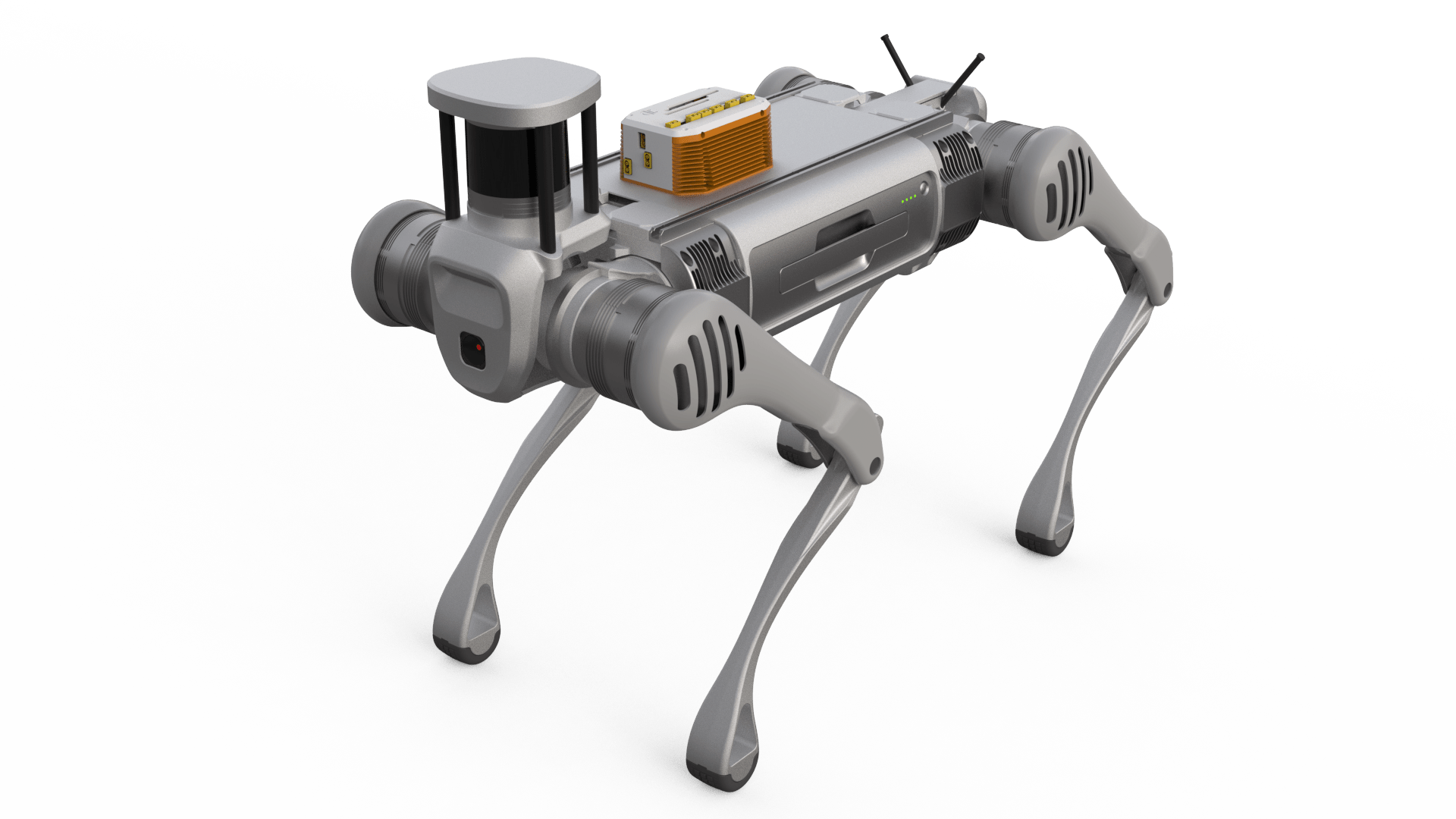
Below: An InDro Robotics Cortex mounted on a Unitree B2 quadruped. Cortex enables remote teleoperations, autonomous missions – and much more…

InDro Control Module ICM

BACKGROUND


There’s some important history here – which also tells you something about the InDro Robotics ethos.

In November of 2021, we released a very popular product. InDro Commander was developed in response to the needs of clients who wanted to be able to quickly turn a platform into a smart, easily customisable robot capable of teleoperation over 4G or 5G. From developers and academics through to large technology companies, our clients had been requesting such a solution. In fact, even in the development of our own products we identified the need for an all-in-one solution to speed robot integration and enable teleoperation.

“Our engineering team came up with the concept of the InDro Commander after integrating and customizing our own robots,” said Philip Reece, CEO of InDro Robotics, when the product was launched. “We realized there were hurdles common to all of them – so we designed and produced a solution. Commander vastly simplifies turning a platform into a fully functioning, teleoperated robot.”

Commander, as this webpage explains, “is designed to allow developers to quickly customize their own robotic solution. The following are common additions that can be easily added to any Commander-controlled robotic system: LiDAR (2D/3D), PTZ camera, thermal cameras, wireless charging, IMU, RTK.”

Commander, quite simply, takes the pain out of integration.

And how does it do that? Well, it ships with a powerful EDGE computer pre-loaded with ROS1 and ROS2 folders. It also contains multiple USB ports, allowing for the instant addition (and recognition of) pretty much any sensor you can throw at it. It allowed clients who were previously spending a ton of time on integration to simply attach Commander to the robot’s power supply, start plugging in sensors, and then remotely operate via a secure dashboard.

When it was first released, Engineering Lead Arron Griffiths dubbed it “ROS-in-a-Box.” We later changed that to Commander, but here’s the splashy video released at the time in advance of the big IROS show, where Commander made its debut:

SMARTER, FASTER, SMALLER


At InDro, we have a motto of “Invent, Enhance, Deploy.” But deployment doesn’t mean we rest on our laurels. InDro’s engineers continuously look at ways to enhance existing products. And that’s exactly what we’ve done with Commander. We asked ourselves: How could we make this even better?

“InDro Cortex grew out of the idea of making a general purpose backpack/module that any OEM could put on their motorized product – everything from a ground robot to even a golf cart, drone, car, truck or RC platform,” says Engineering Lead Arron Griffiths. “That single module makes any platform ROS-enabled, AI-ready and 5G connected.”

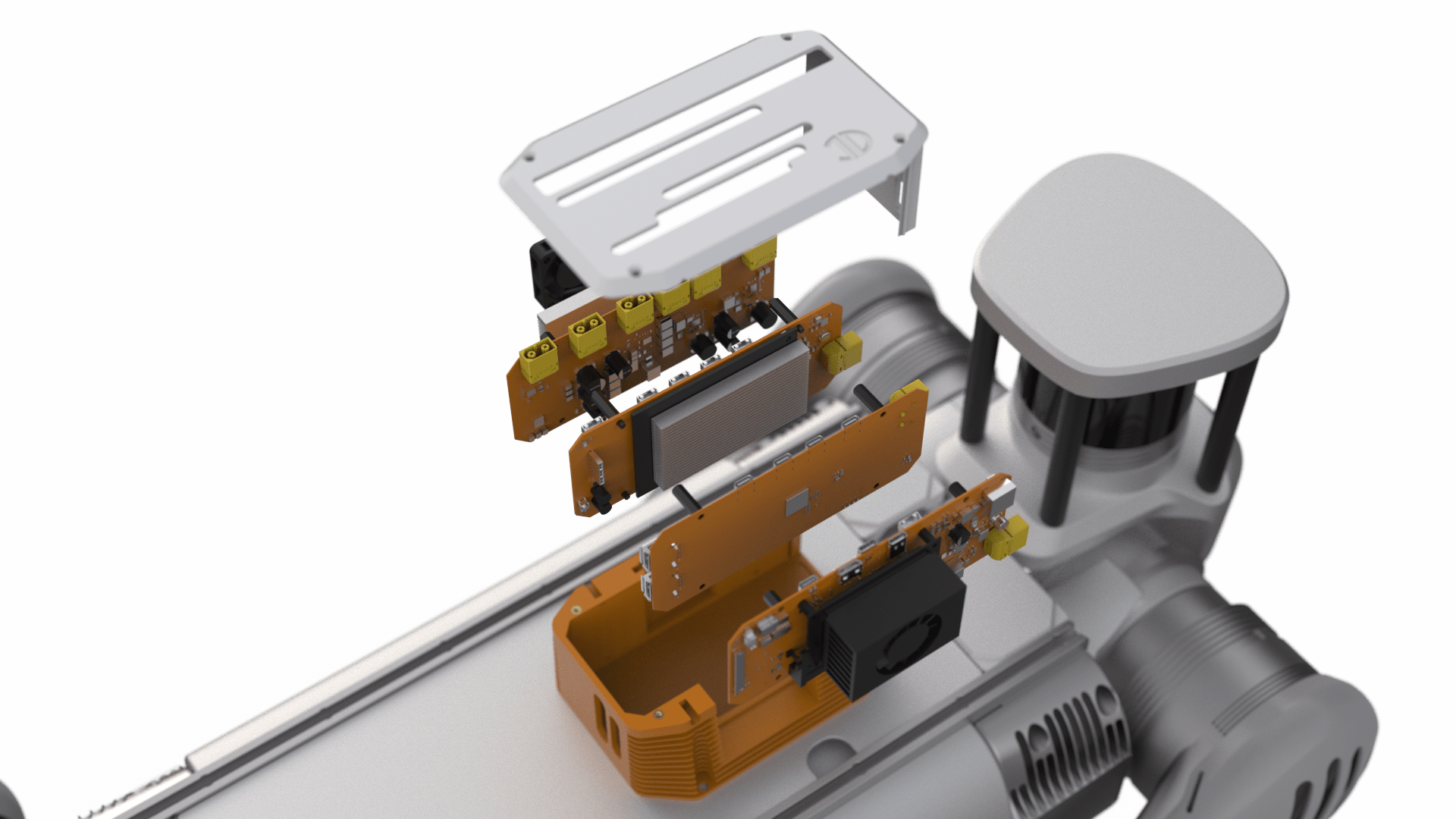
A lot of work went into this. One of the biggest tasks was designing and developing four new boards that pack a lot of AI compute power (and other features) into a tiny space. There are separate boards for EDGE computing, teleoperation data transfer, and sensor integration. There’s also a separate WiFi system.

“And of course, it can run on either a public or private 5G network,” says InDro Vice President Peter King.

And did we say size matters? The small size of Cortex means it can be placed on virtually any robot – from the smallest quadruped to the largest AMR. It can even be fitted to a drone.

“It’s tiny so it fits on everything. So basically we can turn any platform into a very powerful robot without all the time and hassle,” adds King.

Below: Much of the magic of InDro Cortex lies in the design, development and testing of four new circuit boards:

InDro Control Module ICM

AUTONOMY AND INDRO CONTROLLER


InDro Cortex is a powerful solution on its own. But pairing it with our new InDro Controller provides incredible synergy.

We just wrote a fairly comprehensive post about InDro Controller, so if you’d like more details you can check this out. But in a nutshell, InDro Controller is a powerful desktop UI for operating any robot. With a highly secure data connection, InDro Controller automatically senses all key parameters of any robotic device. It will automatically detect any sensors, providing a data feed from all of them with minimal latency.

“It can handle all sorts of data,” says Front-End Developer RJ Bundy. “It doesn’t matter if the robot has standard or custom sensors, InDro Controller can automatically detect and visualize them. For example, if you added a radar unit to an existing robot, the system will pick up on that immediately.”

InDro Controller provides the operator with a highly customisable dashboard for carrying out complex missions. It will also keep track of any missions manually carried out, and make them repeatable as autonomous missions.

And that autonomy? InDro has created two different autonomy software stacks. One is for outdoor missions that rely on GPS; the second is for indoor missions like SLAM in GPS-denied environments. That software comes with InDro Controller – and is also loaded onto the module. So the two key elements of this system – InDro Controller and InDro Cortex – have been made to operate seamlessly together.

Anyone should be able to configure and control Cortex for their product, and indeed, their solution,” says Griffiths.

Below: A look at the powerful InDro Controller UI dashboard. The Controller software has been created to be an ideal match for InDro Cortex and is easy to operate.

Teleoperations with Robots

INDRO’S TAKE


We’re extraordinarily proud of the work our engineering team has put into Cortex – as well as InDro Controller. We believe these two, in combination, set a new bar for both robot integration and complex remote teleoperations.

“The design and creation of the boards used in Cortex was a significant technical challenge – and a significant achievement. The same can be said of our two new autonomy stacks,” says InDro Robotics CEO Philip Reece.

“Whether it’s a ground robot, a drone, or some other device that requires high processing power and minimal latency with all the features enabled by ROS, Cortex allows developers to quickly transform virtually any platform into a powerful autonomous robot with minimal effort.”

Interested in learning more? Of course you are. Contact our Head of R&D Sales, Luke Corbeth, right here.


New InDro Controller: A simple solution to complex robotics missions

New InDro Controller: A simple solution to complex robotics missions

By Scott Simmie


InDro Robotics – as always – has been hard at work on innovative new products. And we’re particularly proud of our latest accomplishment: The InDro Controller.

It’s an all-in-one solution for operating virtually any type of robot from a highly secure console. It’s completely robot-agnostic, very easy to use – and exceedingly powerful. We’ll get into the details as we go, but first let’s hear from Front End Developer RJ Bundy with an elevator pitch.

“It’s an all-in-one data visualization, robot management and robot control software,” he says. “Whether you’re a student first learning how to use a robot or you’re a commercial giant, you’d be able to manage and maintain all of your robots.”

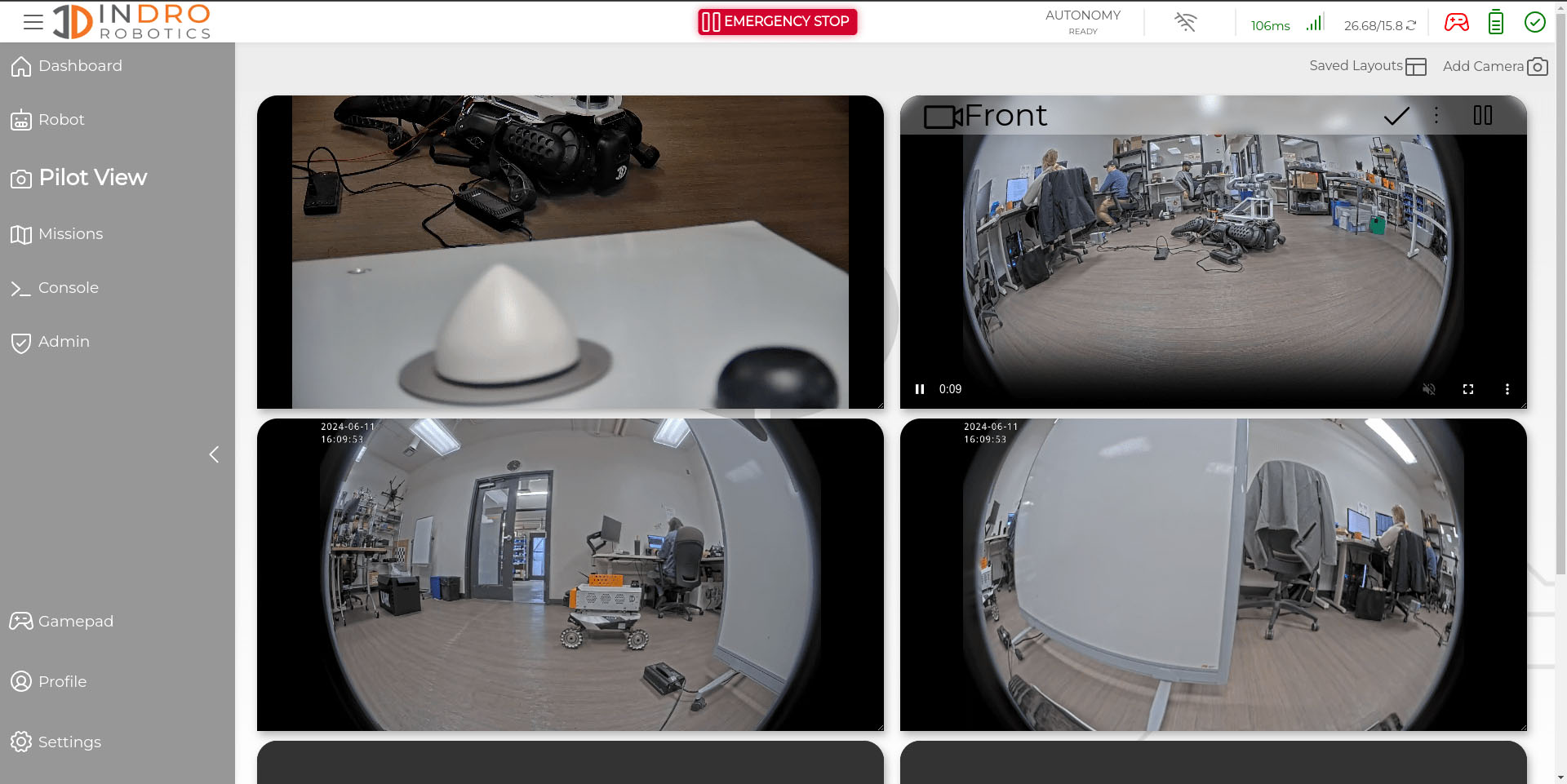
He’s not exaggerating. We walked through a demo of this system recently, with Head of R&D Sales Luke Corbeth at the controls and Bundy explaining the various features. We connected remotely with one of our InDro robots. The software immediately detected all of the sensors on the platform, offering up a display of windows showing the data they were collecting with minimal latency.

“It can handle all sorts of data,” says Bundy. “It doesn’t matter if the robot has standard or custom sensors, InDro Controller can automatically detect and visualize them. For example, if you added a radar unit to an existing robot, the system will pick up on that immediately.”

Of course, it has teleoperation. Missions can be run manually or autonomously (with InDro’s autonomy stack loaded onto any ROS-based robot).

“We have a GPS-based autonomy – which is better for outdoors – and then we have a SLAM- (Simultaneous Localisation and Mapping) based autonomy which is ideal for indoors,” says Corbeth.

And while InDro Controller has very complex capabilities, it’s a snap to use.

“Once it’s set up, it’s pretty straightforward to initiate the mission. Even someone without any robotics knowledge could do it,” he adds.

Below: The Pilot View mode in InDro Controller. Data from any desired sensors is displayed with minimal latency via a highly secure connection.

Teleoperations

HIGHLY SECURE


Regardless of whether you’re a startup, researcher, or a major corporation collecting sensitive data – security is important. InDro Controller has been built with that in mind.

“We’ve created an interface that makes it very hard for a third party to intercept any of those commands or the data coming from the robot to you.”

Though the person controlling the robot is the primary login, others with a secure login can also monitor the missions remotely from anywhere in the world. The software can store as many repeatable missions as you can throw at it, and you can initiate a previously stored mission with a single click.


MISSION PLANNING


Mission planning could not be simpler.

For the first mission, the pilot would manually control the robot. InDro Controller uses an Xbox controller plugged into your computer for intuitive operation (though other options are available). All buttons on the Xbox device can be quickly mapped to carry out specific functions.

InDro Controller tracks everything you’ve done – and we mean everything – and saves it as a repeatable autonomous mission.

“If you manually drive the robot somewhere, it will remember it’s been there and it’ll be able to go back, follow that same path every time. It will also remember to carry out any specific actions you’ve taken at those points of interest, including camera angles, zoom, etc.” says Bundy.

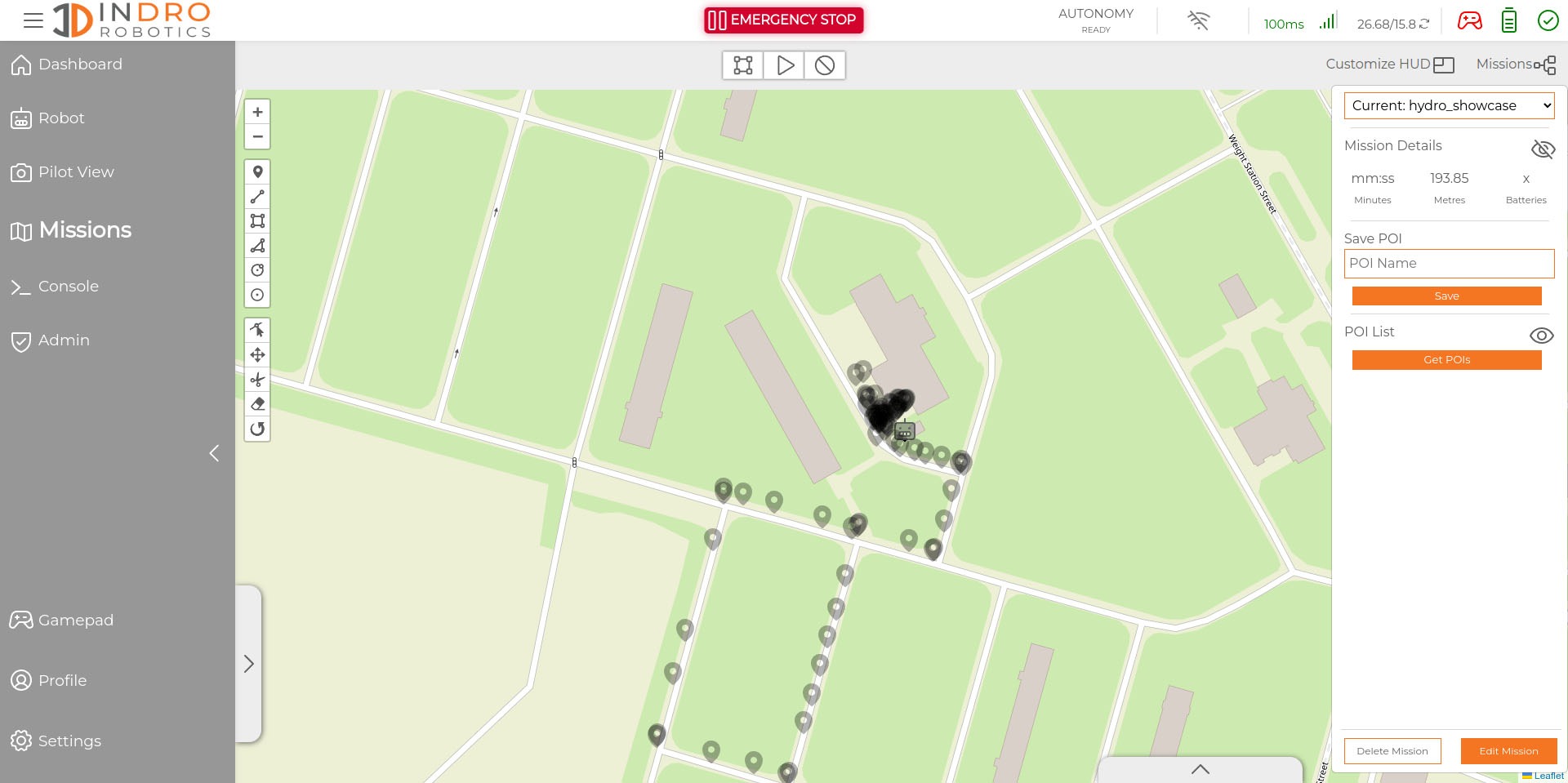
The mission planner also automatically loads a map to locate your robot (you also have the option of satellite view), so you can monitor exactly where it is on any given mission.

And, of course, it can do this for an entire fleet of robots.

Below: InDro Controller shows Points of Interest – which can be repeated with saved missions

Robot Teleoperation

HIGHLY CUSTOMISABLE


InDro Controller has been designed to allow users to easily customise the user interface for any robot, any mission, and any dashboard view. Multiple streams of data, including upload and download speeds, battery levels and overall robot health are available at a glance. Oh, and did we mention it also works with third-party autonomy stacks?

“The dashboard, the cameras, the heads up display on the autonomous missions – those all can be customised,” says Bundy. “We’re also adding other personal user customisations, like a light and dark mode, metric conversion, schedule missions – all the kinds of features you could want.”

InDro Controller already works exceptionally well. But – as with all of our R&D projects – it will continually be refined with additional features and functionality.

“We’re heavily invested in continuously improving the software,” says Corbeth. “So regardless of which version you’re shipped, know that this is something that InDro Robotics is constantly developing and improving with client feedback in mind to ultimately provide the best mission planning, teleoperations and development software tool in the robotics industry.”

Speaking of versions, there’s a simpler version of InDro Controller – which does not have the autonomy features – already being used for missions in the academic world. Feedback has been excellent.

“Users tell us they find it InDro Controller Lite exceedingly powerful, but also very simple to use. That was exactly our goal in developing this product,” says Corbeth.

Academics and corporate innovation groups could take advantage of the Lite version, while the InDustrial package is intended for solving more complex problems in an industrial environment


SATISFYING R&D


For Front End Developer Bundy, who oversaw this project with support from other engineering staff, it’s been a hugely satisfying – and challenging – project.

“A lot of the customization features were pretty difficult because it has to be robust and dynamic, which is always tough,” he says. “This is a relatively complicated application and I’ve managed to put together something pretty nice and functional – and it will only get better. “I’ve had a bunch of other help, but putting together the UI for InDro Controller has been, and continues to be, highly satisfying.”

Teleoperating Robots

INDRO’S TAKE


We’re obviously excited about InDro Controller. And we’re particularly excited because we have a forthcoming piece of hardware – the InDro Module. It’s a small box with a lot of brains that can be added to any robot to increase functionality and enable the seamless addition of sensors and other modifications (as well as pre-loaded autonomy stack and ROS drivers). We’ll have more on that soon, but it’s the perfect match for InDro Controller for users with complex requirements.

For the moment, we’re looking forward to putting both the Lite and InDustrial versions into the hands of clients.

“When we first began remote teleoperation several years ago, we relied on third-party software as the UI,” says InDro Robotics CEO Philip Reece. “But we found it wasn’t powerful or customisable enough for our needs. It also required that we have our own autonomy stack – and we did – but many clients do not. InDro Controller comes with our proprietary autonomy stacks for both outdoor and GPS-denied locations. And, as noted previously, this is a long-term project, where even early adopters can be assured the package will be continuously refined with additional features.”

Word has already been spreading in the R&D and commercial fields about this product, and the feedback from those using the Lite version has been outstanding. Interested in learning more or seeing a demo? Contact Luke Corbeth here.